Digital Cyber security lock

SECURITY CENTER

Protect your account

We empower you with advanced security features, including the latest Passkey technology, and provide proactive tools to help you identify and prevent fraud.

Protecting our members’ data and funds is our highest priority.

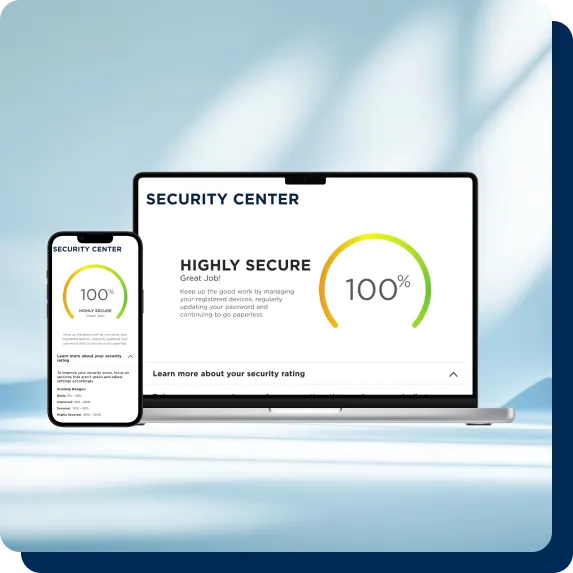
Security Center Dashboard

Your security is our priority

We understand the importance of keeping your account secure. Our Security Center provides you with a simple way to monitor and manage your security settings, giving you confidence and control.

  • Track login activity: Quickly review recent logins for peace of mind.
  • Strengthen security with MFA: Easily manage your multi-factor authentication devices.
  • Stay informed with alerts: Receive notifications about important security events.

Your Security

 
  • Set up account, get help
  • Set up MFA (Passkey ready)
  • Check your security score
Security Shield icon

Security Reporting

 
Safety Lock icon

Secure Payments

 
secure payment options
digital security lock hovering over an open hand
Secure

Test your cybersecurity knowledge

Protect yourself from scams and fraud by testing your knowledge of common cybersecurity threats. This quick quiz will help you identify phishing attempts, recognize warning signs of fraud, and learn best practices for keeping your personal and financial information secure.

Secure

PENFED CYBERSECURITY QUIZ

0%

Using the same password for online banking, email, and shopping sites is safe if it’s complex.

Your bank calls and asks you to read back a one‑time code they just texted you. What should you do?

A pop‑up says, “Your device is infected. Call this number now.” What’s the best response?

Which of these are common warning signs of a fraud attempt?

Legitimate government agencies will never demand payment by gift cards, crypto, or wire transfer over the phone.

You receive a message from "USPS" or "Amazon" about a package issue or suspicious purchase, asking you to click a link or provide payment/account information. What should you do?

thumbs up gesture adjacent to a digital security shield with a checkmark

Thanks for taking the quiz!

Staying secure online doesn’t require technical expertise—just smart habits. Using unique passwords, protecting verification codes, and staying alert to scams can go a long way in keeping your accounts safe. Log in to set up account alerts and more.

Apply before becoming a member.

After your application, we’ll help you:

1. Discover you’re eligible to become a PenFed member

2. Open a Savings/Share Account and deposit at least $5

Handshake representing security and trust

If you have found a vulnerability...

Your vigilance protects all PenFed members. If you’ve identified a potential security bug or vulnerability on a PenFed internet site, please share the details with us.

Phishing is the activity of defrauding an online account holder of financial information by posing as a legitimate company or entity.

Types of phishing

  • Appeal to greed: An attacker will offer you a method to make some easy money.
  • Appeal to fear: A hacker will tell you your bank account has been hacked. They may tell you that your computer has been filled with malware and must be cleaned immediately.
  • Appeal to authority: A hacker will attempt to mimic someone in charge and ask you to do something because of their position.
  • Appeal to human kindness: An attacker may send an email stating they really need your help to do something.  The email may even appear to be from someone you know.

How to “avoid” phishing

  • Take your time. Don’t interact if you’re suspicious.
  • Verify the contact’s identity. Confirm through an outside channel.
  • Be very careful with email and text message attachments. If suspicious, don't open or download the attachment.
  • Do not immediately click on email and text message links. First hover over the link and verify the address.

Card Member Security helps protect PenFed cardholders from fraudulent activity by identifying suspicious transactions and sending alerts to cardholders. It also assists with reporting fraudulent transactions and reporting cards as lost or stolen.

PenFed automatically enrolls all credit and debit cardholders in text alerts using the mobile number on file. Text alerts are a Free-to-End-User (FTEU) service, so there is no cost for enrollment, and text message rates do not apply to members. If Card Member Security sends a text message, it will come from the number 91937.

PenFed chip-enabled credit and debit cards offer enhanced security when used at chip-enabled terminals and over the phone. Your card is also protected by Visa’s Zero Liability Policy if lost, stolen, or fraudulently used.

Follow these online security best practices to protect your accounts and online activities.

  • Avoid interacting with suspicious numbers. Add trusted numbers to your contacts. 

  • Protect your funds. Never send money or information to anyone you personally do not know. 

  • Verify your transactions. Review your account activity regularly. 

  • Know your vendors. Familiarize yourself with how common vendors display in your account history.

  • Utilize security alerts. Set up and receive account alerts in PenFed Online or in your PenFed mobile app. 

  • Use only secure apps. For electronic payments, always use trusted applications like PenFed’s mobile application or Apple Pay and Samsung Pay.

  • Protect your card information at the point of sale. Use contactless payment methods, when available.

  • Beware of skimmers.
    • Skimmers are small devices that are designed to fit over card slots and keypads to collect card data and card PINs.
    • Common places for these are ATMs and gas pumps.
    • Some are virtually impossible to spot. If the card reader is loose or you see exposed wires, do not use it.
  • Protect your card information online. Do not provide your information online unless you are making a purchase from a website you trust. Secure sites typically will direct you to a secure page with a URL starting with “https://.” Also, ensure the email address/link is from a reputable and known sender and always double-check for misspellings (example; Amazon vs. Annazon).

  • Update your software. Make sure your device has the latest security updates installed. 

  • Know that browsers are not safe for storing user credentials. Decline any offers when a browser asks you if you want to store our credentials for later. To avoid future storage offers, turn off these offers in your browser settings.

  • Know how PenFed communicates with you. At times, PenFed may reach out to you with offers or important information regarding your account. Knowing how we communicate with you will help you better tell legitimate PenFed communications apart from those of scammers. 

    • Email: Email from PenFed will have a sent from email address ending in @penfed.org or @penfed.info. Always review sending email addresses as scammers like to spoof or impersonate organizations like PenFed. 

    • Text message: If Card Member Security sends a text message, it will come from the number 91937.

    • One-time passcodes: 1-540-751-4198 or 1-787 -663 -6947 (PR) For security during high-risk transactions, PenFed uses a two-factor authentication system called a one-time passcode (OTP) that will come from one of the above numbers. PenFed also uses OTP when members are attempting to unlock their PenFed Online access. Never share OTPs with anyone.

Follow these password security best practices when you log into any accounts or use your PIN.
  • Always secure your device with a password to protect it if it should ever be stolen.
  • Memorize PINs or keep them in a secure password manager.
  • Change your password regularly, every 60-90 days.
  • Do not store credit card numbers, PINs, or passwords where others may find them.
  • Shield your PIN.
  • Do not reuse passwords.
  • Do not give your passwords to anyone.
  • Turn off or decline browser offers to save passwords.

  • Online security procedures also apply to your mobile device. When using your mobile device to access your accounts or engage in transactions, follow all general online security procedures, as well as the following mobile-specific practices.
    • Avoid connecting your smart phone to an untrusted wireless network. Only download apps from official stores such as iTunes or Google Play.

    • Never “root” or “jailbreak” your mobile device to get around limitations set by your carrier or device manufacturer. Rooting involves adding, editing, or deleting system files, and jailbreaking allows you to bypass system restrictions. These activities remove protections that are built into your device to defend against mobile threats.

PenFed is federally insured by the National Credit Union Administration (NCUA) through the National Credit Union Share Insurance Fund (NCUSIF).

That means your deposits are insured up to at least $250,000 per individual member for the total in your regular share (savings) accounts, share draft (checking) accounts, money market accounts, and share certificates. 

If you have more than $250,000 at PenFed any single federal credit union of which you are a member, there are options available for additional share insurance coverage.

Just as with FDIC insurance for banks, NCUSIF coverage does not cover losses on money invested in mutual funds, stocks, bonds, life insurance policies, and annuities offered by affiliated entities. It does protect members at all federally insured credit unions from losses on a broad spectrum of savings and share draft products.

Follow these steps if you believe your identity has been compromised:

1. Contact your financial institutions and creditors. Speak with their fraud departments and explain that someone has stolen your identity.

2. Check your credit reports, and place a fraud alert on your file. Initiate a fraud alert by contacting one of the following three credit bureaus. Once you contact one bureau, the other two bureaus are notified automatically.

Equifax: 1-888-766-0008

Experian: 1-888-397-3742

TransUnion: 1-800-680-7289

3. Watch out for suspicious emails, phone calls, or text messages asking you for your personal information. Always verify that any communication is legitimate by calling the organization back through an official phone number.

A merchant compromise is an organized theft of ATM, debit card, or credit card information.

We continuously monitor transactions for suspicious activity. If we detect that your PenFed card may have been part of a merchant compromise, this does not necessarily mean that fraud has occurred — or will occur — on your account. However, we may deactivate your current card and issue you a new one as a precaution to make sure your account and personal information are safe.

Suspicious email: Forward the email to abuse@penfed.org. Please be sure to include your contact information in case questions arise.

Suspicious text message: Send a screen shot of the suspicious message to abuse@penfed.org. Please be sure to include your contact information in case questions arise.

Suspicious phone call: Report the call at abuse@penfed.org. Please be sure to include your contact information in case questions arise. You may also call us at 1-800-247-5626.

  1. Select “Set up your online account or get help signing in” from the login page. 
  2. Follow the on-screen instructions to receive an email with your username and/or to reset your password online.