
Find Member Number
Your member number
- Is a portion of the account number of the Regular Savings or Premium Online Savings account you opened to establish your PenFed membership
- Can be found by removing the last three digits of your savings account number
- Can be found in any of the following locations
PenFed Online
Log in to PenFed Online.
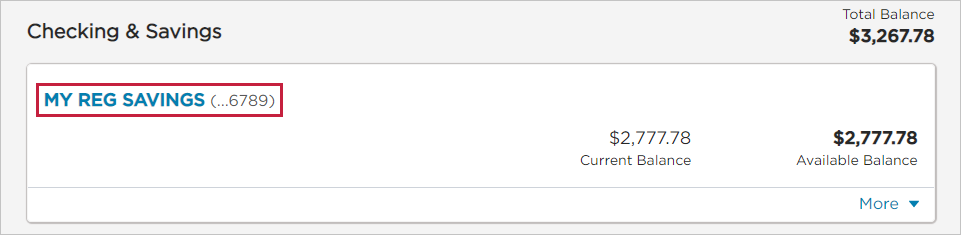
Scroll down to your account and click on the account name or nickname.
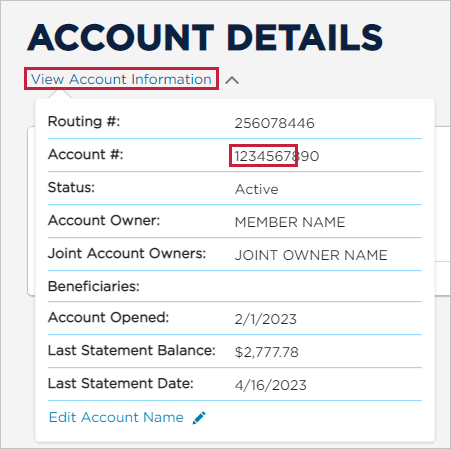
Click View Account Information to display your full account number.
Mentally “remove” or cover up the last three digits of your account number. The remaining numbers form your member number. Example: if your account number is 1234567890, your member number is 1234567.
PenFed Mobile
Log in to the PenFed Mobile App.
Tap the account you want to view.
Tap the blue plus icon at the right of the Available Balance to display your full account number and PenFed's routing number.
Your member number is the string of numbers that appears before the first dash ( - ) of your Regular or Premium Savings account number.
Example: if your account number is 1234567-890, your member number is 1234567.
Electronic or paper statements
Locate one of your consolidated statements.
Locate the Summary of Accounts section and view your savings account information.
Your account number will be labeled in that section.
Mentally “remove” or cover up the last three digits of your account number. The remaining numbers form your member number. Example: if your account number is 1234567890, your member number is 1234567.
You can also find your member number in your new membership welcome packet.
Please note: Your member number is different than your account numbers.
Click here for information on where to find your account numbers.