



How it works

Login
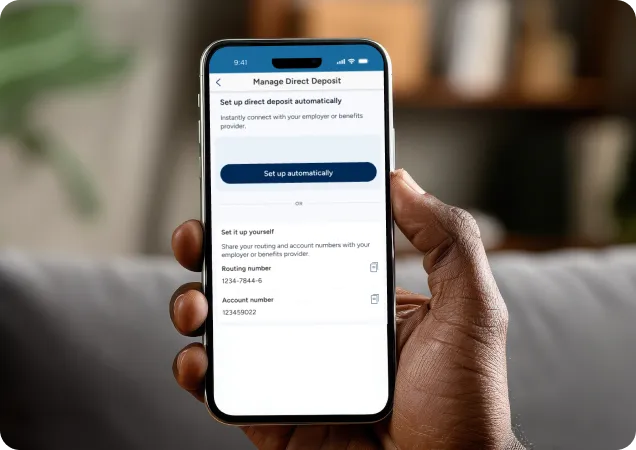
Sign in to the PenFed mobile app and select Direct Deposit from the More menu under Account Details

Start Setup
Choose the automatic setup option

Connect & Confirm
Securely connect your employer or benefits provider and choose how much of your paycheck to deposit

Get your account and routing numbers
Find them in the PenFed app or on your account statements
Log in to your employer’s payroll portal
Access the direct deposit settings in your HR or payroll system
Enter your PenFed banking details
Add your routing number and account number, then save changes
FAQs
Direct deposit is a secure and convenient way to have your paycheck or government benefits automatically deposited into your bank account electronically. Instead of receiving a paper check, your employer sends your pay directly to your account through the Automated Clearing House (ACH) network.
You can set up a direct deposit with PenFed in two ways.
- For the fastest experience, use PenFed’s automatic direct deposit setup feature to securely connect with your employer or benefits provider and set up direct deposit in minutes.
- Alternatively, you can set up direct deposit by providing your PenFed account and routing numbers to your employer or payroll provider.
- Open the PenFed Mobile App and select your eligible account. Eligible account includes Free Checking, Access America, Complete Access, Pencheck Plus, and Premium Online Savings.
- Select ‘Manage Direct Deposit’ from the ‘More Actions’ menu
- Choose Set Up Automatically.
- Find and securely connect to your employer or benefits provider.
- Choose and confirm how much of your paycheck you'd like to deposit into your PenFed account.
Once confirmed, your employer may need to review or approve the change, and it may take a few pay cycles before the update takes effect.
Yes. Depending on your employer and payroll provider, you may be able to direct either your entire paycheck or a portion of it to your PenFed account.
The setup process typically takes just a few minutes. However, the timing for your updated direct deposit to take effect depends on your employer's payroll schedule and processing timelines.
You'll receive confirmation during the setup process once your direct deposit information has been updated. You may also receive email confirmation from your payroll or benefits provider. Your employer's payroll processing schedule will determine when the changes take effect.
The feature is available to all members with eligible PenFed checking accounts and Premium Online Savings accounts.
No. In most cases, you can update your direct deposit information directly through the PenFed Mobile App without completing paperwork or contacting HR.
You can set it up by providing your PenFed routing and account numbers to your employer or payroll provider.
PenFed’s RTN is 256078446.
You can find your account number by logging into:
PenFed.org:
- Log in and select your account -> View account information
- Log in and select your account -> More -> Account Management -> Manage Direct Deposit
Mobile App:
- Log in and select your account -> View Account Information
- Log in and select your account -> More Actions -> Account Management -> Manage Direct Deposit
Members with direct deposits to PenFed accounts may receive paychecks up to two days early. Early availability depends on when PenFed receives payment information from your employer or benefits provider.
No. PenFed does not charge a fee for using the automatic direct deposit setup feature.
If you experience any issues during setup, you can use the manual direct deposit setup option.
Disclosures
1
Early access to direct deposit is available for all PenFed members that set up a direct deposit with their employer or paying agency. Early direct deposit eligibility may vary between pay periods and timing of paying agency’s funding.
2
PenFed has partnered with a third-party service controlled and operated by Underdog Technologies, Inc. d/b/a Pinwheel, to provide the digital direct deposit service. By using this service, you authorize Pinwheel to securely connect to your payroll or benefits provider and facilitate direct deposit set up to your PenFed account.