
How to stop payment of a check or ACH
If you lose a personal or official check, or if it should not be paid, you can request a stop payment.
Members are able to place stop payments via PenFed Online for checking account checks, Money Market Savings Account checks, Thrifty Credit Service checks, Personal Line of Credit Checks and Equity Line of Credit checks. Stop payment requests are time sensitive. We recommend you sign into PenFed online or call us immediately if you need to place a stop payment.
Placing Stop Payments
- Log in to PenFed Online.
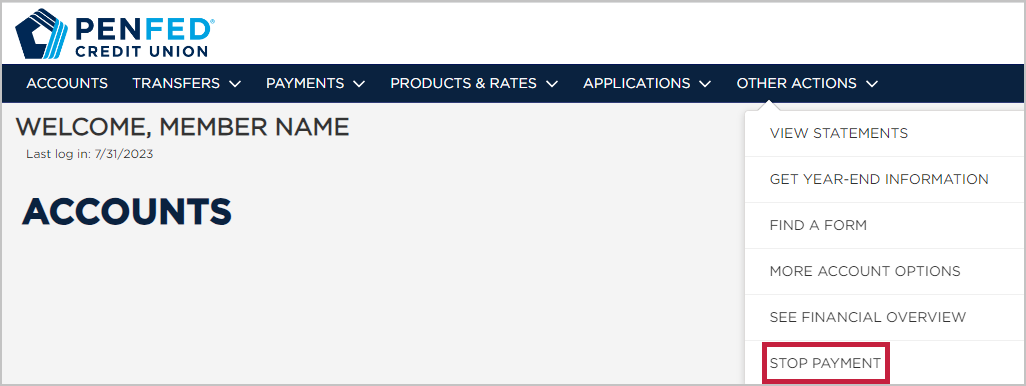
- Click the Other Actions tab, then select Stop Payment.
- Complete the Stop Payment information and click Continue.
- Read and accept the agreements and disclosures, then click the buttons to complete and submit your request.
You should receive a confirmation message. Print this screen and retain for your records.
Account owners must provide the following information:
CHECKS:
Account Number
Check number or range or numbers
Date of check
Payee
ACH:
Account Number
Amount or amount range
Payee
Please be advised that it is extremely important that this information is complete and accurate; incorrect information may cause delays and may cause the check or ACH to be paid, despite the stop payment order.
Removing Stop Payments
Stop payments on official checks cannot be removed. For all other stop payments, upload a hand-signed request to remove the stop payment to PenFed.org/secureupload.
Notes:
Once received and processed, stop payments on personal checks are effective immediately, and stop payments on PenFed official checks may take 5 to 7 business days to take effect.
If you need to place a stop payment on an ACH transfer, or for additional assistance, please contact us.
If you’re looking to stop or edit a recurring payment you set up through PenFed Online.